
Tuesday, March 30, 2010


Wednesday, March 24, 2010
Desktop

the background image of a display screen, on which windows, icons, and other graphical items appear
Thursday, March 18, 2010
Wednesday, March 17, 2010
How to make coffe
In the morning when my parents are making their coffe before the go to work. They usually fill up the kattle with water first. Then they place it on the stove, and turn it on high. They usually wait 9-15 minutes till the water is hot. They grab their personal cup and pour the water in the cup. They get the powder coffe and they use a table spoon and they decide how many tea spoons of coffe they should add. After they are done with that they get the suger and add at least 2-3 tablespoons and stur it and thats how they make the morning coffe
Friday, March 12, 2010


Software development

is a multistep process that begins with a need to perform a task more efficiently using a computer
Operating systems

is an interface between hardware and user which s responsible for the management and coordination of activies and the sharing of the resources of a computer, that acts as a host for computing applications
Network operating system
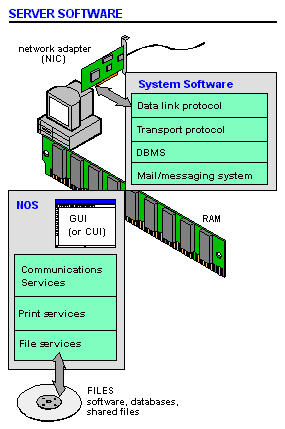
is an opertaing systyem that contains components and programs that allow a computers on a network to serve request's from other computer's for data and provide access to other resources such as printer and file systems
Multitasking

is a method by which multiple tasks, also known as processes, share common processing resources such as a CPU

Language translators

is a computer program that translate one programming language instructions into another programming language instruction without it losing its original meaning
Thursday, March 11, 2010
Graphical user interfaces
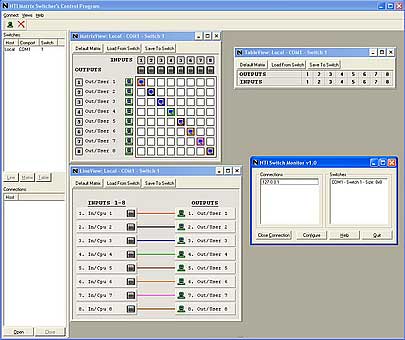
is a type of user interface item that allows pepole to interact with progams in more way then typing such as computers, hand held devices and mp3's


Wednesday, March 10, 2010

Tuesday, March 9, 2010

Wednesday, March 3, 2010
Computers thru time
In grade school i came across like these some what nice apple desktops but thy where big and kinda fat. I also saw the old versions cellphones like we use today....i remember using the orginal big ipod (80 gb) or like the Sidekick or Sidekick 2. Now we have new versions of the ipod and cells phones like the ipod touch and sidekick 3, ID, Slide, LX,08,o9. Technology has advanced greatly since grade school's, computers got faster, smaller, transportable. New and new thing are being invented as the days go by.
Now for my parents when computers were out they looked like dinosuars when i saw a picture them.....in her time it was like the begining of the new future, my mom remembers when she first got her job using a computer, it was hard for her to learn at first but she caught on quick but during the past 30 years, like she hasn't used a computer and her sight isn' that good she doesnt know what she is doing like the have been upgraded big time since her time.
I asked my grandparents what they thought about the computer that came out in there time and their answer was"we was really amazed with the technology but we didnt get one because back then they were really expensive for us and plus it looked like some day they where gonna make a better one that is going to end up brian washing the kids to stay up all night using the internet"
Now for my parents when computers were out they looked like dinosuars when i saw a picture them.....in her time it was like the begining of the new future, my mom remembers when she first got her job using a computer, it was hard for her to learn at first but she caught on quick but during the past 30 years, like she hasn't used a computer and her sight isn' that good she doesnt know what she is doing like the have been upgraded big time since her time.
I asked my grandparents what they thought about the computer that came out in there time and their answer was"we was really amazed with the technology but we didnt get one because back then they were really expensive for us and plus it looked like some day they where gonna make a better one that is going to end up brian washing the kids to stay up all night using the internet"
Expatatios and goals
Wells what i expct from this class is to learn more then wat i already knew about computers....to expand my knowledgeof it. I also expect my classmates to be respectful and to listen to what other students have to say
For my goal i want to learn how to repair parts that i learned about and how remember what are the function of each somputer
For my goal i want to learn how to repair parts that i learned about and how remember what are the function of each somputer
What is a BIOS?
BIOS is a de facto standard defining a firmware interfce
the initial function of the BIOS is t identify ,test, and initalize systems devices such as video display card, hard disk, floopy disk and other hardware
the initial function of the BIOS is t identify ,test, and initalize systems devices such as video display card, hard disk, floopy disk and other hardware
Tuesday, March 2, 2010
Input Devicesis any peripheral used to provide data and control signals to an information processing system

any peripheral used to provide data and control to signals to an information processing system
Impact Printers

is a peripheral which produces a hard copy of documents stoed in electronic for, usaly on phyiscal print media such as paper or transparencies


Monday, March 1, 2010

CD-ROM

is a pre-pressed compact disk that has data accessible to, but not writble by a computer for data storage and music playback


• American Standard Code for Information Interchange (ASCII):

it is a character-encoding scheme based on te ordering of the english alphabet
5 different types of computers
Personal computers(PC)
Desktop
Laptop
Personal Digital Assistants(PDA's)
Minicomputer
Desktop
Laptop
Personal Digital Assistants(PDA's)
Minicomputer
What are the parts of a computer?
Central Processing Unit(CPU)
Memory
Random-memory Memory(RAM)
Read-only Memory(ROM)
Basic input/output system(BIOS)
Caching
Virtual Memory
Flash Memory
Motherboard
Power Supply
Hard Disk
Operating system
Integrated Drive Electronics(IDE) Controller
Accelerated Graphics Port(AGP)
Sound Card
Graphic Card
Ports
Real-time Clock
Complementary Metal-oxide Semiconductor
Fans, heat skins and cooling systems
Memory
Random-memory Memory(RAM)
Read-only Memory(ROM)
Basic input/output system(BIOS)
Caching
Virtual Memory
Flash Memory
Motherboard
Power Supply
Hard Disk
Operating system
Integrated Drive Electronics(IDE) Controller
Accelerated Graphics Port(AGP)
Sound Card
Graphic Card
Ports
Real-time Clock
Complementary Metal-oxide Semiconductor
Fans, heat skins and cooling systems
Subscribe to:
Posts (Atom)